Tampilkan postingan dengan label BlackBerry. Tampilkan semua postingan

Tips BB supaya gak lemot

1. Usahakan tiap dua sampai tiga hari cabut/lepas donk itu batere si BB, lalu diamkan selama satu sampai dua menit…. Sebentar kok :) . Karena ini berfungsi untuk membuang dan menghapus sisa file yang tidak terpakai akibat proses chatting dan Browsing,etch.
2. Lakukan secara rutin Clear Log Event, dengan cara tekan tombol ALT + LGLG , lalu akan muncul dilayar hasil Log,tekan tombol logo, pilih Clear Log(jika bahasa inggris) atau bersihkan Log (jika bahasa indonesia), tekan delete .
3. Lakukan juga yah secara rutin Clening Memory, dengan cara pilih optins, security optins,cleaning Memory, tekan tmbl logo, lalu pilih clean now.
4. Tiap 2-3 hari sekali,lakukan juga Host Routing Table dengan cara :
¨ Pilih Options
¨ Lalu advance Options
¨ Pilih Host Routing Table
¨ Tekan tombol logo
¨ Setelah itu pilih Register Now
5. Dan setelah step ke 4 diatas,lakukan 2-3 hari sekali Diagnostic Test, ini sangat penting karena melalui inilah kelihatan di layar apakah si BB kita terkoneksi semua,baik PIN,Register maupun koneksi E-mail. Dengan cara :
¨ Pilih Options
¨ Lalu Mobile Network
¨ Lalu tekan logo
¨ Pilih Run
¨ Biarkan sampai proses berjalan Completed
¨ Jika hasil proses ada yang Abort, ulangi lagi jangan sampai ada yang Abort
Baca Selanjutnya - Tips BB supaya gak lemot

Read Users' Comments (0)

[Blackberry] An easy way to save energy

Here you can save Energy Batteries for Any Type Blackberry (Blackberry Bold, Blackberry Curve, Blackberry Curve, Blackberry Torch, Blackberry Curve, Blackberry Strom) ..


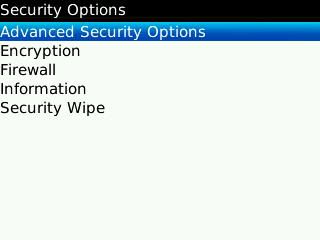
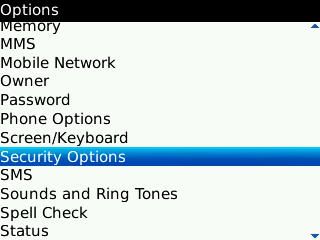
1. Go to Menu Options, select Security Options


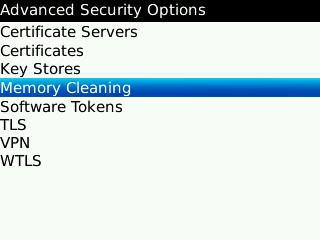
2. Go to the menu "Advanced Security Options"

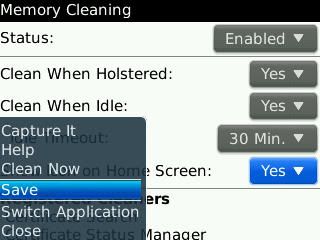
3. Then select "Memory Cleaning"


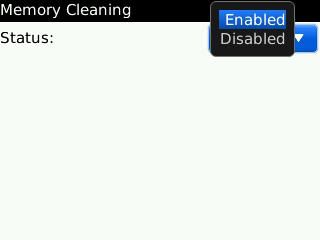
4. Select "Enabled"


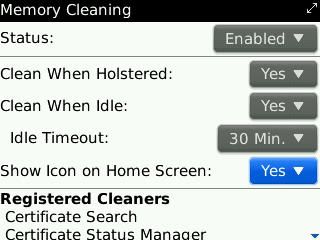
5. Show Icon on Home Screen, select "Yes"


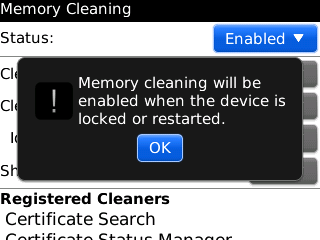
6. If so, press the BB menu icon, then select Save. And click "OK" on the warning that appears.


Memory Cleaner will run automatically clear the clipboard and optimizing memory on your BlackBerry. And will automatically run when your BlackBerry is locked or restarted.

But the effect will make your BlackBerry becomes slow when booting, because the Clean Memory will start when the new BlackBerry is switched on. But it would make the system more stable job, because the memory is clear.

If you do not want the old boot, you can make the choice to be disabled and do it manually Memory Clean.
Many activities can be done by the BlackBerry, so that the memory becomes full, and often result in all activities to be felt long. So that BlackBerry users often seek third-party applications to ease memory, prevent memory leak and even maximize the memory penggunana. Namely by using application Booster Memory, Flash Memory or the other.

But not everything is running normally, sometimes even your Blackerry device so hang because the application does not fit.
Here are tips and ways you can use to address the full memory of your BlackBerry with BlackBerry built applications.

Go to "Options" menu, then open "Security Options"
Baca Selanjutnya - [Blackberry] An easy way to save energy

Read Users' Comments (0)